
Speedrun Due Diligence Automation in 48 Hours
Built an AI-powered due diligence automation system using n8n, LlamaIndex, Pinecone, and Claude. From brief to board-ready PDF reports in less than 2 working hours.
Project Overview
Client: Highlane Partners (AI & Investment Advisory)
Role: n8n Developer / AI Automation Specialist
Timeline: 2 days (weekend sprint)
Key Results:
- Upload investment documents (PDF, DOCX, XLSX) and get a board-ready analysis in minutes
- Full RAG pipeline: document parsing, vector embeddings, intelligent retrieval
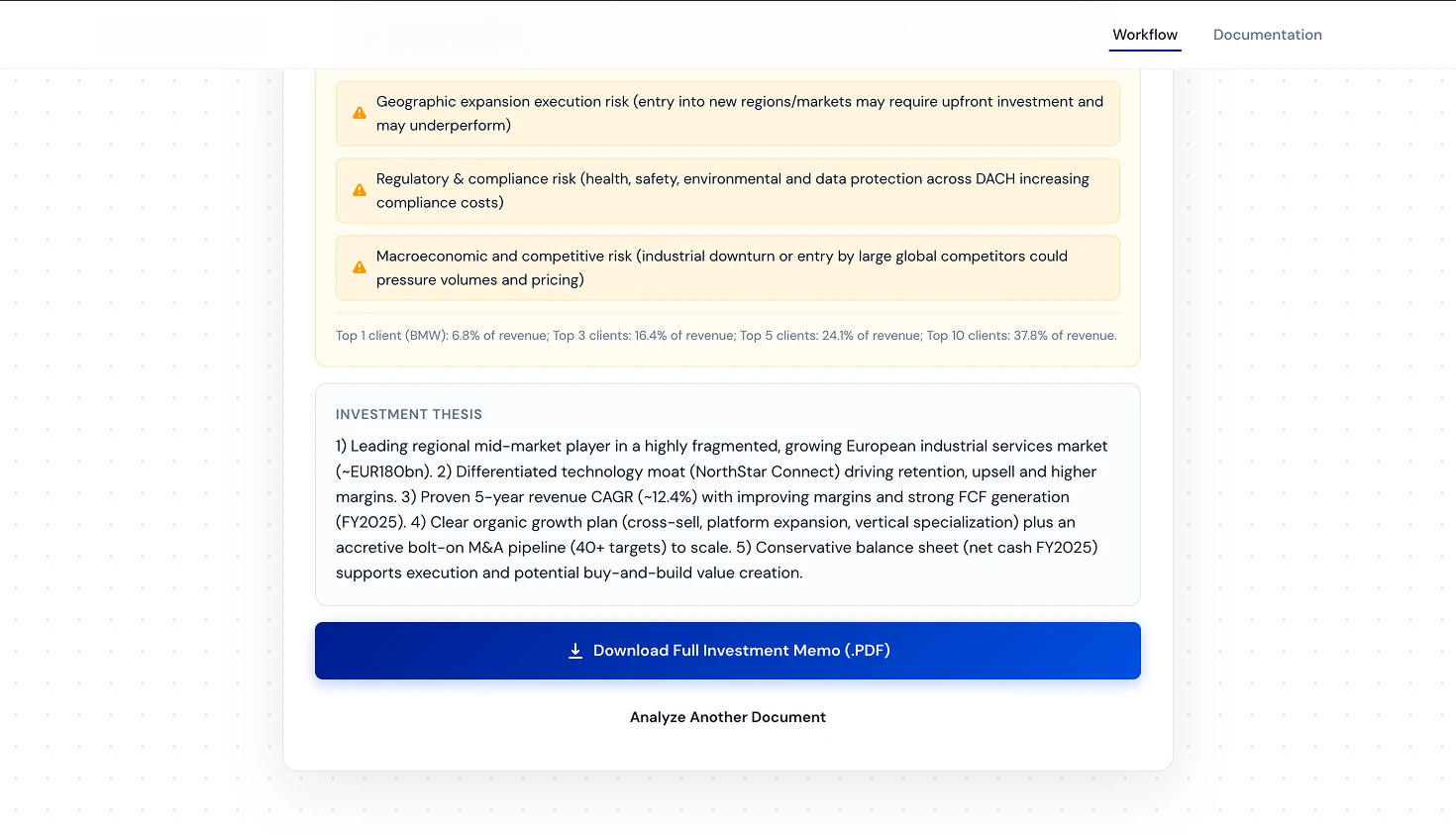
- Structured output: Company Overview, Financial Metrics, Risk Alerts, Investment Thesis
- Production-ready UI + comprehensive documentation (neither was in the brief)
Core Expertise Applied:
- n8n Workflow Automation
- RAG (Retrieval-Augmented Generation) Architecture
- AI Document Processing (LlamaIndex)
- Vector Search (Pinecone)
- Frontend Development (AI-assisted with Gemini 3 Flash)
The Brief Landed on a Thursday
Here’s how the timeline looked: brief received on Thursday, deadline on Monday, and a full weekend in between. A weekend that was supposed to be, you know, for the family.
The brief itself was refreshingly straightforward. Accept file uploads, chunk the text, store embeddings in Pinecone, use Claude to extract structured financial data, generate a PDF report. “Keep it simple. Prove the concept works.” That was literally the last line.
Two days of work. Simple POC. Easy, right?
Except I have this annoying habit of over-delivering. The brief asked for a basic upload interface. My brain immediately went: “But what if we also build a proper frontend? And documentation? And make the report actually look like something a board member would take seriously?”
So yeah, a simple POC turned into a full-blown automation system. In 48 hours. Over a weekend.
What the Brief Asked vs. What I Built
Let me be honest about the gap between the ask and the delivery, because I think this is where the value became clear.
The brief asked for:
- Single file upload interface
- Basic text extraction and chunking
- Pinecone storage with embeddings
- Claude-powered data extraction
- A PDF report with structured data
What I actually shipped:
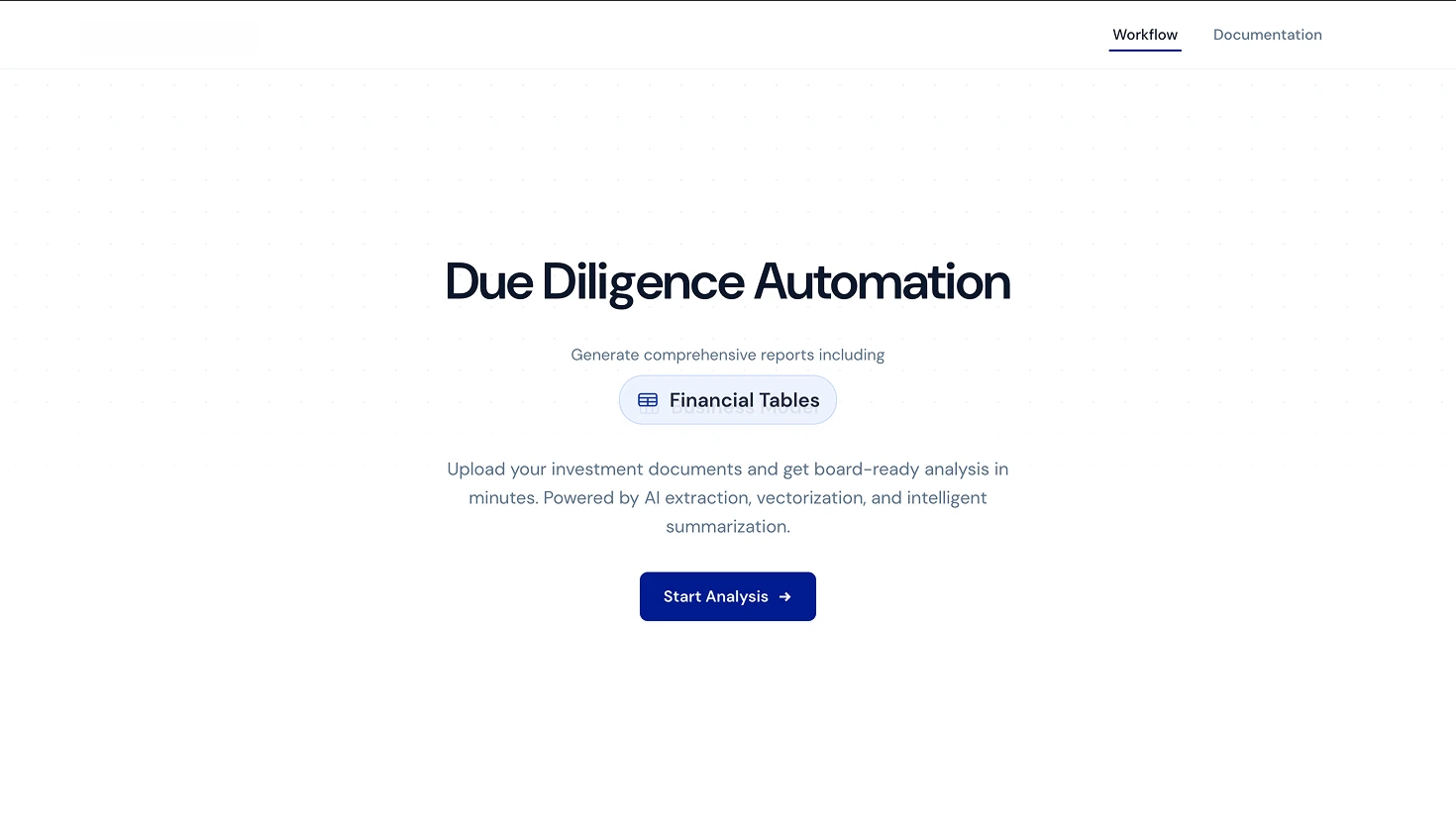
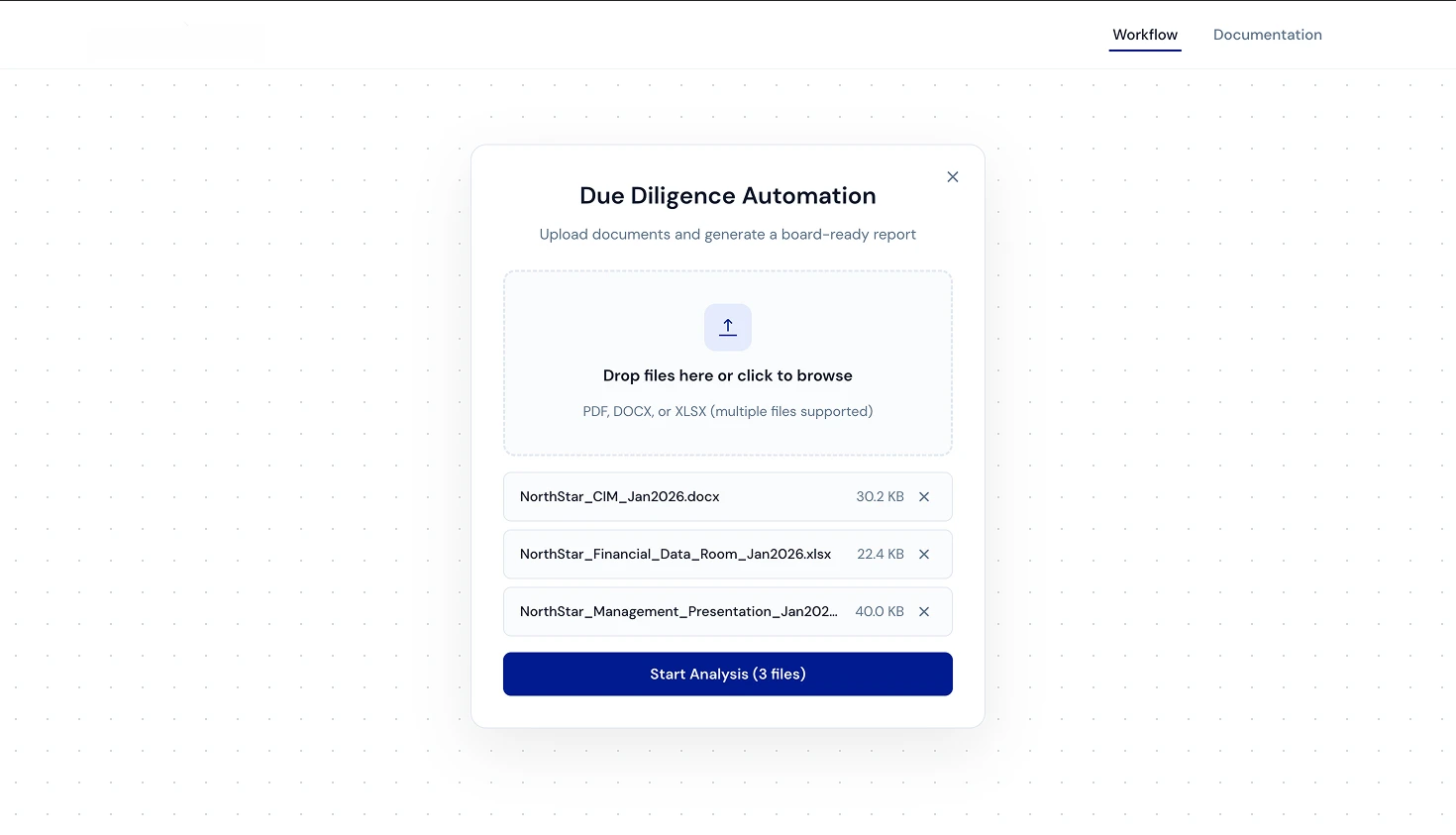
- Multi-file drag-and-drop upload supporting PDF, DOCX, and XLSX simultaneously
- A clean, production-ready frontend built with Gemini 3 Flash and OpenCode
- Full RAG pipeline with LlamaIndex parsing, Pinecone vector storage, and intelligent retrieval
- Structured report output with Company Overview, Key Metrics (with YoY calculations), Risk Alerts, and Investment Thesis
- Downloadable PDF with professional formatting
- A complete documentation site at dda.atlr.dev/docs
The n8n Workflow
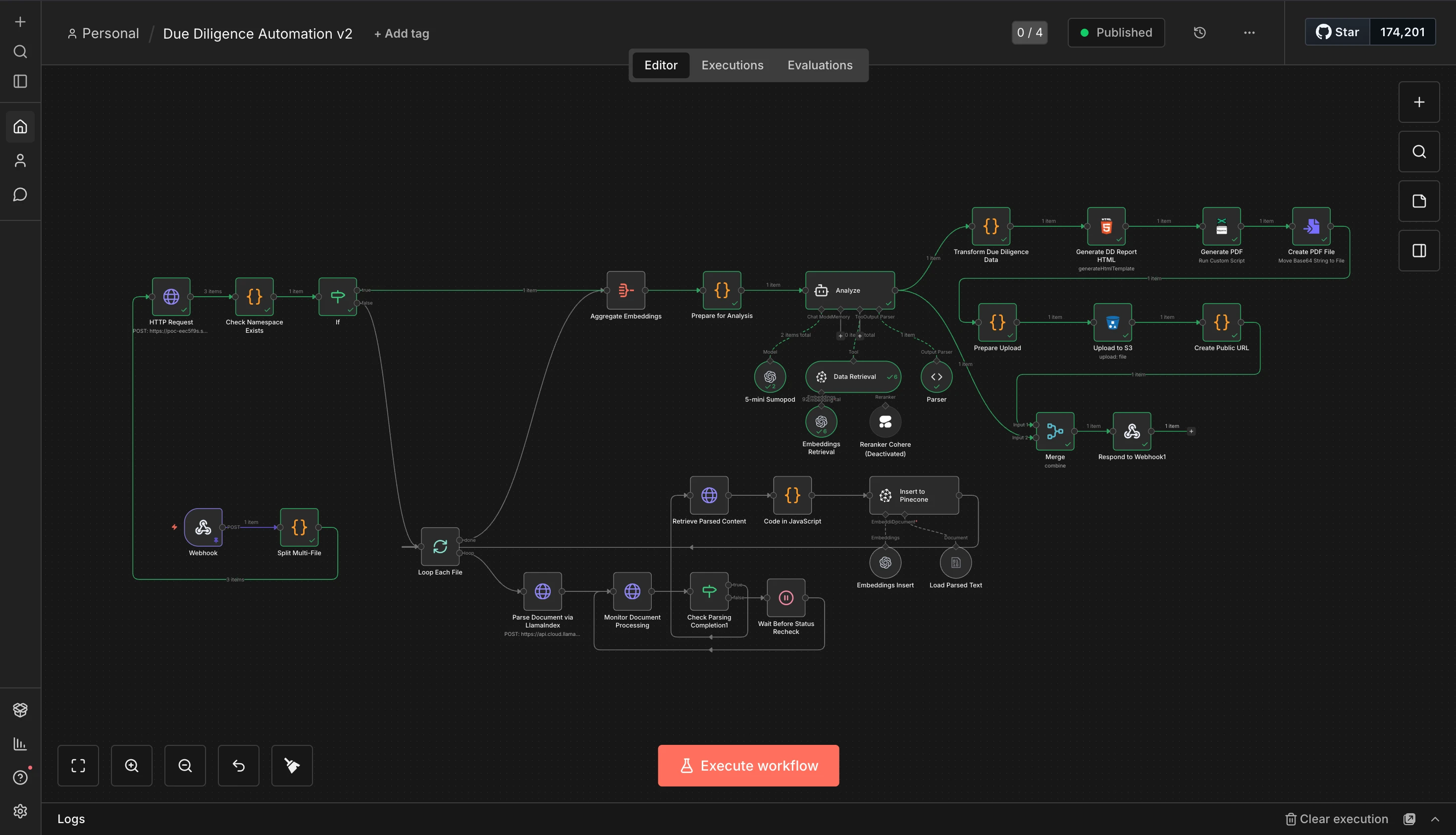
This is where it gets fun. The entire backend is a single n8n workflow, no custom server, no Express app, no deploying containers. Just n8n doing what n8n does best.
Here’s how the pipeline works:
1. Document Ingestion
A webhook receives the uploaded files. The first thing the workflow does is split multi-file uploads and loop through each document individually. Each file gets sent to LlamaIndex’s LlamaParse API for parsing. This is the part where I had to implement an async polling pattern: send the document, wait, check if parsing is done, wait again if not. The “Wait Before Status Recheck” node saved my sanity here.
2. Embedding & Storage
Once parsed, the text gets chunked and processed through a JavaScript code node that prepares it for Pinecone. Each chunk gets embedded and stored with metadata including the deal ID and chunk index. The namespace isolation per deal ensures that different analyses don’t contaminate each other’s results.
3. RAG Analysis
This is the core intelligence. The workflow checks if embeddings already exist for a namespace (caching strategy, no need to re-embed the same documents), aggregates the embeddings, and feeds them into Claude for analysis. The “Prepare for Analysis” node structures the prompt to extract exactly what an investment analyst would need: company overview, revenue figures, EBITDA, business model, risks, and thesis.
I also experimented with Cohere’s reranker for better retrieval accuracy but ended up deactivating it for the POC. The base retrieval was already producing solid results, and I didn’t want to add API latency for marginal gains on a 2-day deadline.
4. Report Generation
The analysis output gets transformed into structured data, rendered into an HTML template, converted to PDF, and uploaded to S3. The webhook response includes a public URL to the generated report. Clean, fast, and the client gets a download link immediately.
The Report Output
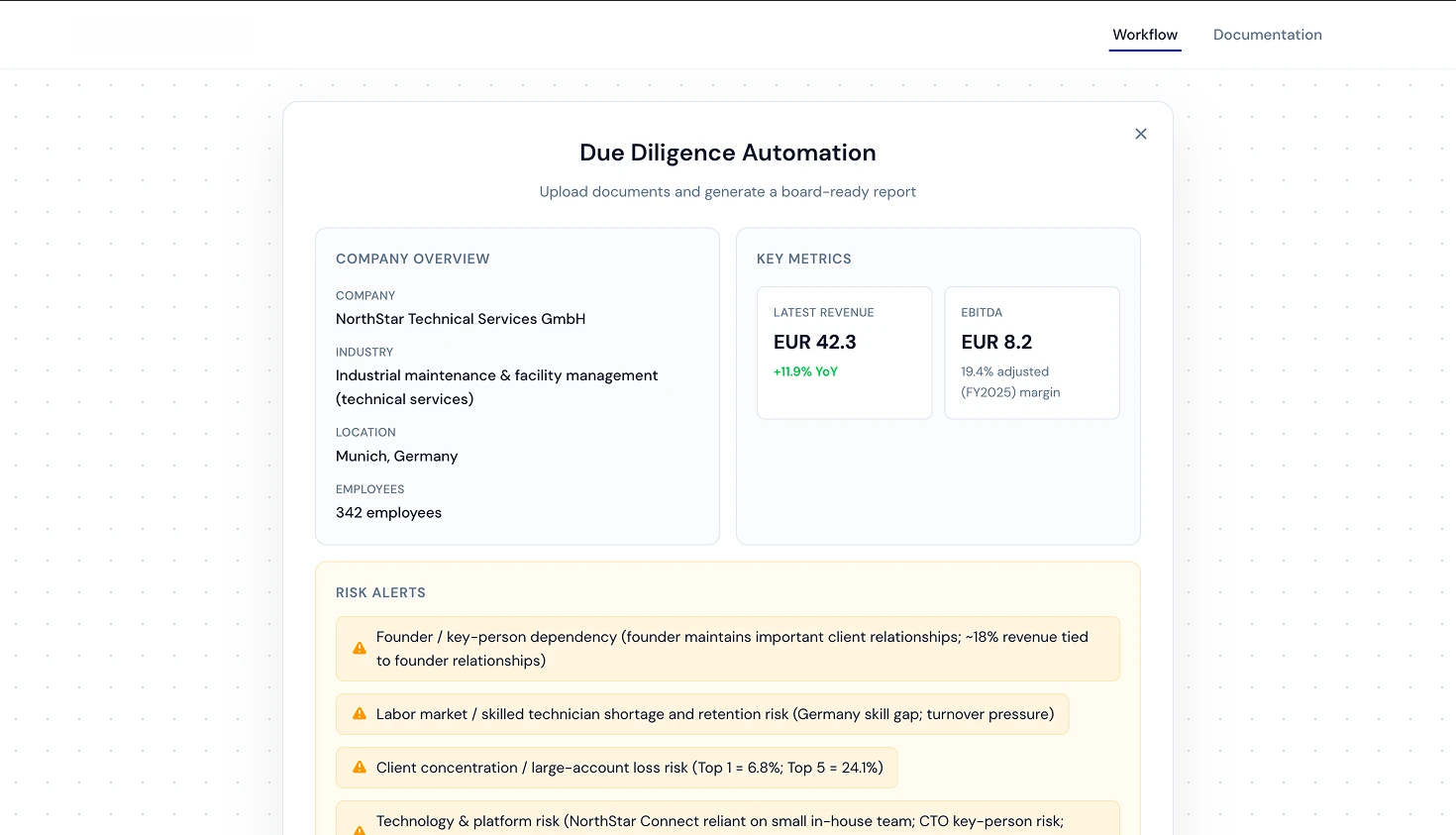
The generated report is structured to be instantly useful for investment professionals. No fluff, no filler, just the data they need to make decisions.
Company Overview pulls the company name, industry classification, location, and employee count directly from the uploaded documents. Key Metrics calculates revenue with year-over-year growth and EBITDA margins. The system is smart enough to pull multi-year data when available and compute trends automatically.
Risk Alerts is probably my favorite section. The AI identifies and categorizes risks with context. In the demo, it flagged things like founder key-person dependency (“~18% revenue tied to founder relationships”), labor market risks specific to Germany, and client concentration risks with actual percentages (“Top 1 = 6.8%; Top 5 = 24.1%”).
The Investment Thesis synthesizes everything into a structured argument, something an analyst would normally spend hours drafting manually.
The Gotchas
1. LlamaIndex Async Polling
LlamaParse doesn’t return parsed content immediately. You submit a document, get a job ID, then poll until it’s done. In n8n, this means building a loop: parse → wait 5 seconds → check status → if not done, wait again. Getting the loop logic right with n8n’s “Loop Each File” node took a few tries, but once it clicked, it handled everything from 2-page PDFs to 50-page investment memos reliably.
2. Namespace Isolation in Pinecone
Early on, I made the mistake of throwing all embeddings into the same namespace. The result? When analyzing Company B, Claude was pulling chunks from Company A’s documents. The fix was simple: isolate each deal into its own Pinecone namespace. But the debugging session at 11 PM on Saturday wasn’t exactly relaxing.
3. The Frontend Speedrun
Building the UI wasn’t in the brief, but I knew a polished frontend would make the POC 10x more impressive. I used Gemini 3 Flashthrough OpenCode to scaffold the entire interface. Landing page, upload modal, report display, everything. What would normally take a day or two of frontend work was done in a few hours. AI-assisted coding is genuinely game-changing for these kinds of sprints.
The Weekend Balancing Act
Saturday morning was for the family. Saturday night was for Pinecone. Sunday was a blur of testing edge cases and making the PDF output look professional. My wife didn’t complain (much), mostly because she’s gotten used to me “just fixing one more thing” at midnight.
The Monday deadline hit, and the system was live, documented, and working. Two days, one weekend, zero regrets.
The Stack
- Workflow Engine: n8n (self-hosted)
- Document Parsing: LlamaIndex (LlamaParse API)
- Vector Database: Pinecone
- LLM Analysis: Claude
- Frontend:Gemini 3 Flash + OpenCode
- PDF Generation: HTML → Puppeteer → PDF via n8n
- File Storage: Cloudflare R2
- Caching: 5-minute embedding cache to avoid redundant processing
- Documentation: dda.atlr.dev/docs